[How to Build Tech #22] How To Actually Build Your Own Distributed File System (with Projects - Full Implementation Code File) and How it Actually Works
Come build with us...comes with implementation code file..

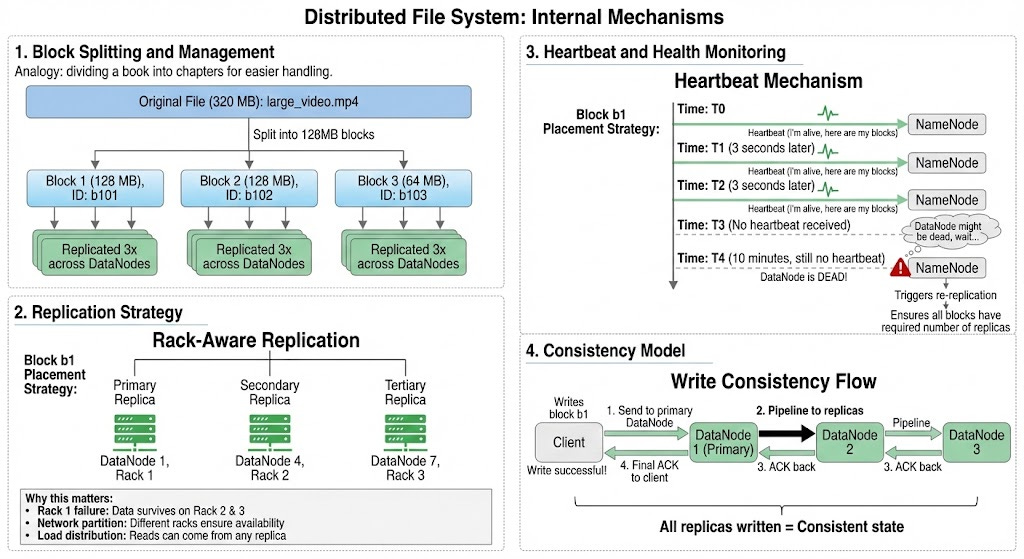
Table of Contents
1. Introduction
2. What is a Distributed File System?
2.1 Key Characteristics
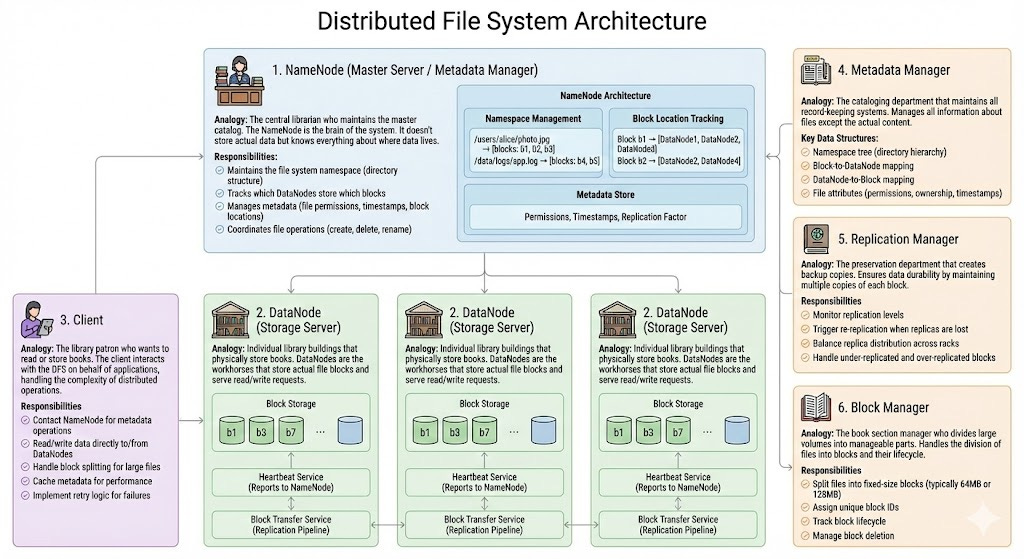
3. Core Components of a Distributed File System and Implementation
3.1 NameNode (Master Server / Metadata Manager)
3.2 DataNode (Storage Server)
3.3 Client
3.4 Metadata Manager
3.5 Replication Manager
3.6 Block Manager
4. How Components Work Together: The Complete Picture
4.1 Write Operation Flow
4.2 Read Operation Flow
4.3 Complete System Architecture
5. Deep Dive: Internal Mechanisms
5.1 Block Splitting and Management
5.2 Replication Strategy
5.3 Heartbeat and Health Monitoring
5.4 Consistency Model
6. Code Implementation: Building the Core Components
6.1 Core Data Structures
6.2 NameNode Implementation
6.3 DataNode Implementation
6.4 Client Implementation
7. Real-World Use Case 1: Distributed Backup System
7.1 Scenario
7.2 Implementation
8. Real-World Use Case 2: Distributed Log Aggregation System
8.1 Scenario
8.2 Implementation
9. Real-World Use Case 3: Distributed Media Storage Platform
9.1 Scenario
9.2 Implementation
10. System Flow: Putting It All Together
11. Performance Optimization Strategies
11.1 Read Optimization
11.2 Write Optimization
12. Fault Tolerance and Recovery
12.1 Handling DataNode Failures
12.2 NameNode High Availability
14. Conclusion: The Big Picture
14.1 Key Takeaways
14.2 Real-World Applications
At the end of this post, you will get runnable CODE ipynb file using which you can directly build this project and develop great understanding of how it actually work. Scroll till the end.
Read More— How to Build Tech and Projects ( Comes with Full Implementation Code File that you build
[How to Build Tech #13] Implemented Advanced Projects
Introduction
Imagine you’re managing a massive library that spans across multiple buildings in different cities. You can’t store all books in one location - it would be inefficient, risky, and slow. Instead, you distribute books across locations, maintain a central catalog, and create backup copies of important volumes. This is exactly what a Distributed File System (DFS) does with digital data.
A Distributed File System is like having a magical library card that makes all books appear as if they’re in one place, even though they’re physically scattered across the globe. When you request a book, the system knows exactly which building holds it, retrieves it for you, and even maintains multiple copies in case one building catches fire.
What is a Distributed File System?
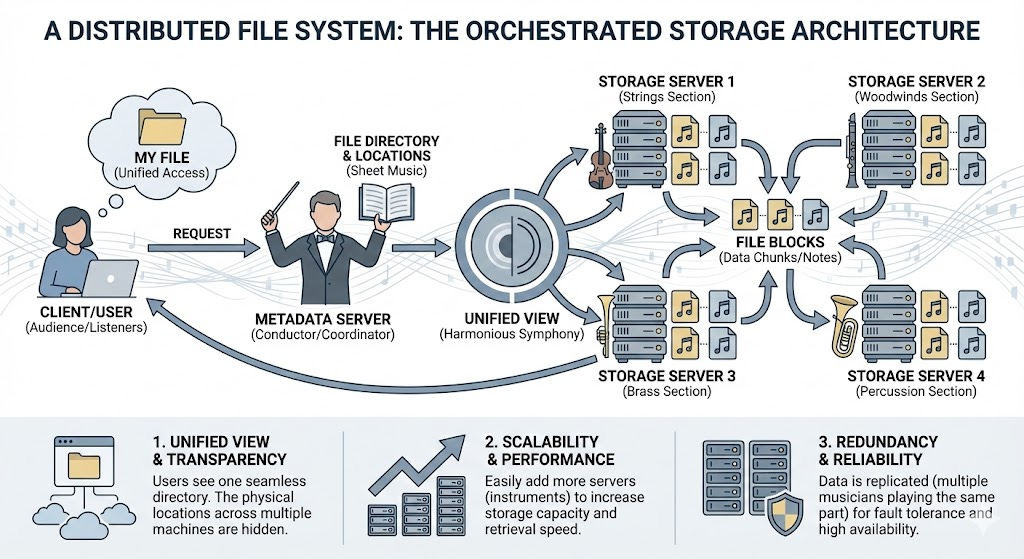
A Distributed File System is a storage architecture that allows files to be stored across multiple machines while presenting users with a unified view. Think of it as a sophisticated orchestra where different instruments (servers) play different parts, but together they create a harmonious symphony (seamless file storage and retrieval).
Key Characteristics
Transparency: Users interact with files as if they’re local, unaware of the distributed nature
Scalability: Can grow by adding more machines (horizontal scaling)
Fault Tolerance: Survives machine failures through replication
Consistency: Ensures data integrity across all replicas
Performance: Parallel operations improve throughput
Core Components of a Distributed File System